
Support Call Guidelines for Basic Troubleshooting
Policy & SOP
Author: Mark Will, Andrew Jones
Date: August 2024
Updated: October 2024
Call Pick-Up Introduction:
Answer the initial customer call
- Introduce yourself
- Confirm the customer account and address
What is the Overlying Issue:
- Ask what the main issue they’re facing is.
- Completely down?
- Slow speeds?
- Something else?
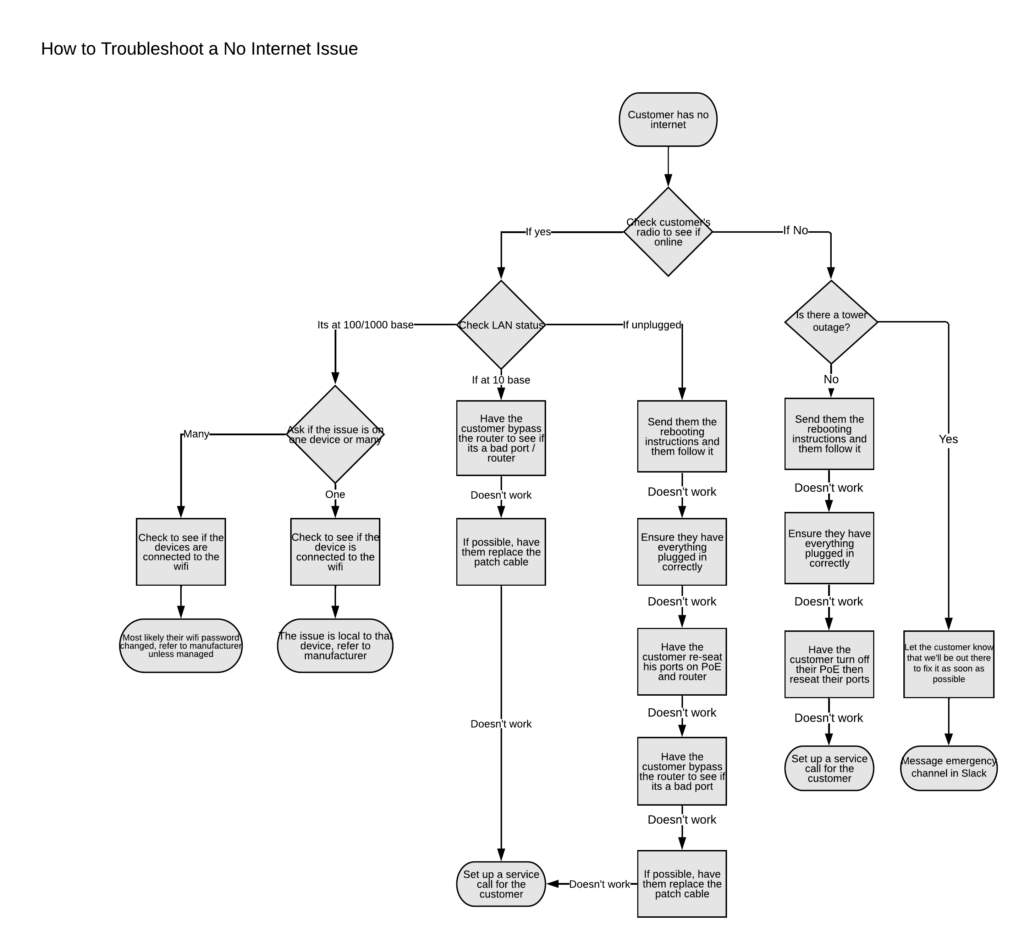
Completely Down:
- If completely down, check their equipment list in PowerCode to see if the radio is down.
- If radio inaccessible
- Try to access it by clicking on the IP address
- If unable to access, instruct CX to go to their router and find the PoE.
- Have them check the light on it and ensure it is on.
- If off, could be faulty wall outlet or dead PoE
- Is it blinking / flashing?
- If yes, could be short in cabling
- then power cycle and see if there’s any change.
- Have them watch the light as they unplug the PoE from power, does it drain very quickly or over time?
- If quickly, radio is still drawing power. – Might be alignment, Schedule SC
- If slowly, no power to radio. – Schedule SC
- Have them watch the light as they unplug the PoE from power, does it drain very quickly or over time?
- If no change after power cycle, ensure cables are in proper locations.
- Cable going out to radio in PoE/power port, cable to router in Gigabit Data/LAN port.
- If everything is correct and they’re still down, try to replace PoE first, if they recently got a new PoE or just want a SC, work on a service call.
- If radio accessible:
- Check Main Ethernet Interface under Device Information
- Ensure it is at 100Base or 1000Base
- If not, cable or port issue, try new port in router other than WAN port.
- If new port does not work, try a new cable.
- If new cable doesn’t work, may be an issue with PoE or router
- Try to bypass the router, plugging any device with an ethernet port in direct to the PoE to see if we get a link
- If they have a newer router (less than 1 year old), replace PoE first
- If they have an old router, instruct them to try a new router first
- Check if a router is getting an IP
- Go to statistics, check the bridging table.
- There should be at most 3 entries.
- If more, cable from PoE likely in a LAN port, rewire to WAN
- Could also be a new router in ap/bridge mode
- If nothing in bridging table, radio is NAT’d
- Check NAT DHCP, should be 1 entry. If none, no router detected.
- Back to potential PoE / cable / router issue.
- Check NAT DHCP, should be 1 entry. If none, no router detected.
- Go to statistics, check the bridging table.
- Check Main Ethernet Interface under Device Information
Slow Speeds:
- Radio is online and everything is connected, but speeds are slow
- Log into the radio and check the capacity of the link
- Go to tools, link capacity test
- Link test mode: Link Test without Bridging
- Duration: 5 seconds
- No other settings should need to be changed
- Ensure that the link test shows speeds that are higher than their current package plan in powercode.
- If lower, a service call may be needed, start getting one set up w/ CX
- If the link test looks good but they still have issues, try to have them bypass the router by plugging a device with an ethernet port in directly to the PoE and running a speed test on the device.
- Direct them to speedtest.net
- If all of the above has been done and there are still issues, escalate the issue to L2 / Engineering, and open a ticket to make sure we let them know once we have looked into it
- Before sending a service call, ensure that the customer is not listed “AS-IS” anywhere
- Log into the radio and check the capacity of the link
Something Else:
- Try to gather as much information as you can, and see if there is a simple fix.
- When all else fails, power cycle PoE / Router
- If there are still issues, gather info and submit a ticket, let the CX know we’ll reach back out when we have more information.
- If you are unable to resolve any issue in a reasonable amount of time, let the CX know we will look into it asap and give them a call back when we can.
No Internet Flowchart