
The attachment to this page includes a ZIP file with default PMP450 configurations for DCB & Bertram radios.
These bridged configurations will work with either DCB or Bertram. Radios will be accessible at 169.254.1.1 after loading the config. You can log into the SMs with either admin/plut0 or root/fgh601 for both configurations – the only difference between the 2 is different SNMP strings depending on whether Bertram or DCB. Just need to add the color code on the radio tab & add the IP address, subnet and gateway after clicking the “Public” radial button on the IP tab when setting them up.
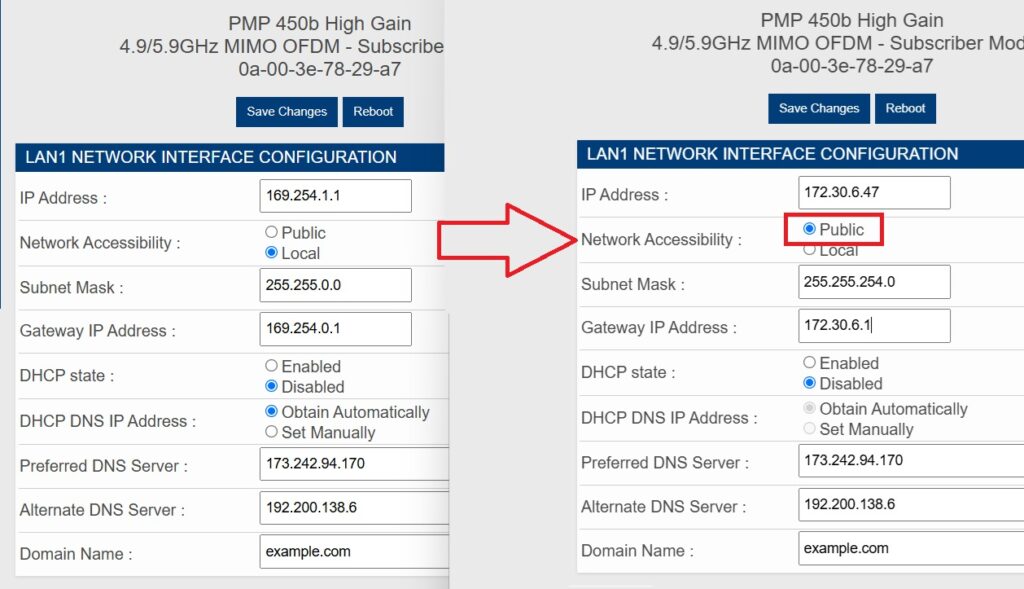
After a reboot the radios will remain accessible at the 169.254.1.1 address locally. It is also handy to update the Site Name under the SNMP tab with the customer ID as well.
For the 3GHz configs only the legal frequencies are checked which significantly reduces the scanning time when the radio boots up.