
Factory Resetting Cambium Router (if needed)
A Cambium r195w router can be difficult to factory default so it is usually easiest to connect to the LAN port and login at 192.168.1.1 using admin for the username and the previous customer’s RADIUS password which is under the services tab in their Powercode account. If necessary to reset the Cambium router the recessed reset button must be held for 30 seconds and will often require multiple attempts. After resetting the router it will be accessible at 192.168.11.1 using admin/admin.
Factory Resetting Readynet Router (if needed)
A Readynet router should be accessible via the LAN port at 192.168.1.1 using admin for the username and the previous customer’s RADIUS password which is under the services tab in their Powercode account. Otherwise it can be defaulted by using a paperclip to press the reset button for about 5 seconds. After resetting the router it will be accessible at 192.168.11.1 using admin/pz938q10m or admin/pz938q10ms depending on the model number.
Loading Default Configuration
After logging into the router click on “Administration”, “Management”, “Choose File”, and select the configuration file and click Upload. You should get a message indicating “The file has been successfully imported!” and you can then reload the router’s login page and login with admin/PassPass and continue setting up the WiFi. Make sure to grab the correct
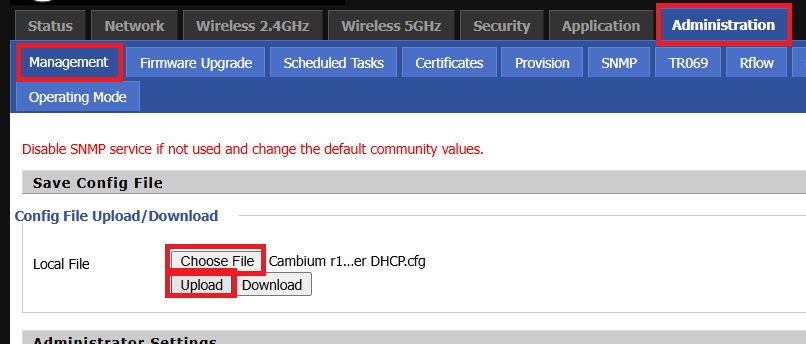
You can find the configuration files as ZIPped attachments at the end of this page. Make sure to select the correct configuration for either the Readynet or Cambium router.
Setting Up the WiFi
Setting up the WiFi name is the same regardless of router model. There are separate tabs for both the 2.4 and 5Ghz WiFi networks. We usually differentiate between the 2.4 and 5GHz WiFi by using “- DCB 2G” or “- DCB 5G” at the end of the wifi name. After making the change click “Save” and “Reboot”
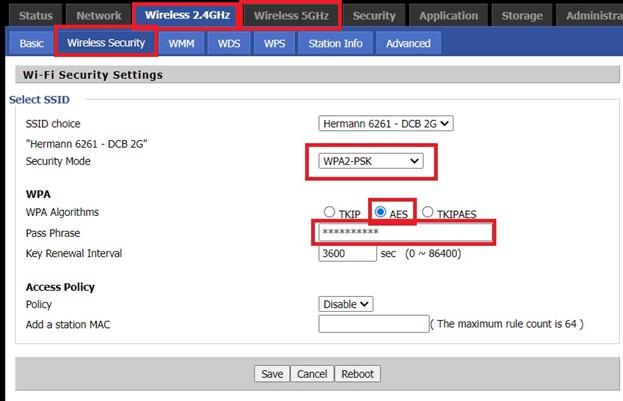
Changing WiFI Channel (Prevent Radio Interference on 2.4)
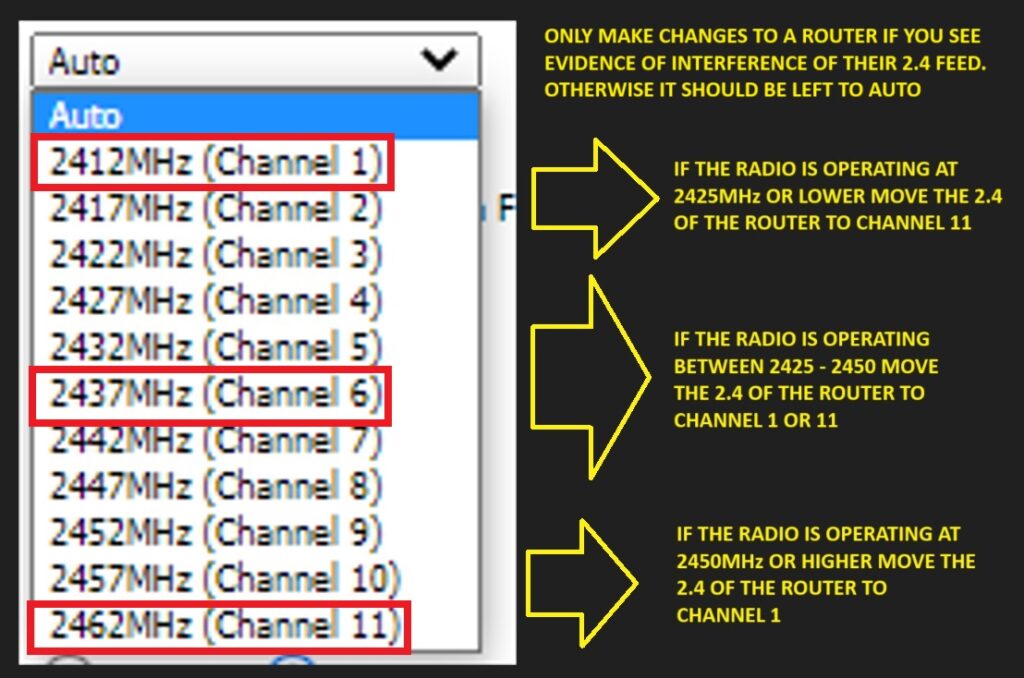
If the customer is on a 2.4 radio you should move the frequency that their 2G WiFi is operating on from auto to a specific channel to ensure it doesn’t interfere with their feed.

Use the chart below to determine what channel to move their wifi to
Other Information
There is no functional difference between a Readynet and Cambium r195w router. Our default configurations for both routers reduces the 2.4 WiFi signal to 70% of the max in order to reduce interference. We also disable compatibility with 802.11b wifi devices for the same reason.